

Scouting America

Model Design and Building
Merit Badge
Scouting America Merit Badge Hub
Requirement Updates 2026

This Merit Badge’s Requirements have recently been updated in 2025 Scouting America Requirements (33216). Please read more about “Requirements” on the Merit Badge Hub homepage. The previous version of the Merit Badge requirements can be found in Scoutbook.


Model Design and Building

Merit Badge Overview

Model making, the art of creating copies of objects that are either smaller or larger than the objects they represent, is not only an enjoyable and educational hobby: it is widely used in the professional world for such things as creating special effects for movies, developing plans for buildings, and designing automobiles and airplanes.
Model-Design_merit-badge-overview

Model Design and Building

Merit Badge Requirements

The previous version of the Merit Badge requirements can be found in Scoutbook

The requirements will be fed dynamically using the scout book integration
NOTE: The official merit badge pamphlets are now free and downloadable HERE or can be purchased at the Scout Shop.
1. Safety. Discuss all safety procedures with your counselor before beginning your modelmaking project, and explain why each is important—both in traditional and computer-assisted design and construction:

2. Types of Models and Materials. Do the following:

3. Planning Your Project. With your counselor's advice, select a subject from requirement 4 for your model project. (You must not use a pre-made kit; your project must be your original design.)
Do the following:

4. Build Your Model. Do ONE of the following using physical and/or computer design methods. Before beginning any model, discuss your approach with your counselor, including the possible use of computer design software such as CAD or 3D modeling tools. Present your plans and completed model to your counselor.
  • (a) Architectural Model.
    Design and build a model of a house to a scale of 1⁄4" = 1'0" (1:48 scale). Begin by creating floor plans and elevations. Include windows, doors, and structural elements. Discuss with your counselor the materials you intend to use, the amount of detail required, outside treatment (finish, shrubbery, walks, etc.), and color selections. You may choose to 3D print elements or use laser-cut parts based on using computer design. Present both your design and final model to your counselor for evaluation.
    Resources: How To Read an Architectural Scale Where 1/4"=1' (video)
    Architectural Model Making Tips + Tricks—An Architect's Guide (video)
    30 Minute Study Model—Here's How (video)
    How To Make Trees and People for Architecture Scale Models (video)
    Adam Savage's One Day Builds: Wood Architectural Model! (video)
  • (b) Structural Model.
    Construct a scale model showing corner construction of a wood-frame building to a scale of 1 1⁄2" = 1'0" (1:8 scale). Begin with a structural layout showing the parts of the floor and wall frames, such as intermediate girder, joist, bridging, subfloor, sill, sole plate, stud, and rafter. Use your plans to assist in building a physical model with cardboard, foam board, or wood. Review with your counselor the parts of the structure and discuss challenges in both your design and build process, gathering the materials and supporting the structure.
    Resource: How To Read an Architectural Scale Where 1-1/2"=1' (video)
  • (c) Process Model.
    Design and build a model showing the plumbing system of your house to a scale of 3⁄4" = 1'0" (1:16 scale) or an agreed upon scale. Show hot and cold-water supply, all waste returns, and venting. After creating your plan, talk to your counselor about how to begin this model, and present the scale and the materials you will use. Build the model using appropriate materials such as tubing, straws, or printed parts. After completion, present your model to your counselor, and be prepared to discuss any problems you had building this model.
    Resource: How To Read and Use an Architect's Scale for Beginners (video)
  • (d) Mechanical Model. Build a model of a mechanical device that incorporates at least two of the six simple machines. You can use digital tools to design and simulate the device before constructing it. Once your design is approved by your counselor, build a working physical model using materials such as wood, plastic, or 3D printed parts. Present your models to your counselor and be prepared to discuss materials used, the machine's function, and challenges you encountered during the construction process.
    Resources: Simple Machines (video)
    Examples of Simple Machines Used in Everyday Life (video)
  • (e) Industrial Model.
    Build a model of an actual passenger-carrying vehicle to a scale of 1" = 1'0" or 1⁄2" = 1'0" (1:12 or 1:24 scale). Begin by measuring a real vehicle and modeling it from multiple views (top, front, rear, sides). You can draw it or use computer design software. From your plans, build a physical model or use digital rendering or 3D printing to produce the final version. Discuss with your counselor which parts were most challenging.
    Resources: How To Read an Architectural Scale Where 1"=1' (video)
    Orthographic Drawing—Simplified (video)
    5 Ways To Sketch a Car With Accurate Proportions (website)

5. Special-Effects Fantasy Model. Design and build a fantasy spacecraft model suitable for a science-fiction film, using traditional modeling and/or computer design techniques. Determine an appropriate scale for your design—one that makes practical sense. Do the following:
Resources: Easy Spaceship Modeling Techniques! (video)
Adam Savage's One Day Builds: Kit-Bashing and Scratch-Building! (video)
  • (a) Research real-world aircraft, submarines, and naval ships for design inspiration.
    Resources: 5 Most Influential Submarine Designs Ever (website)
    15 Future Aircraft Designs That Will Blow Your Mind (video)
  • (b) Design individual components (such as the cockpit, living areas, engines, and storage).
  • (c) Produce a final sketch or a rendered image of the complete model from multiple angles.
  • (d) Discuss your design process and scale choices with your counselor. Describe the materials (physical and/or digital) you used, how you engineered your model and discuss any difficulties you encountered and what you learned.

6. Careers. Explore careers related to this merit badge. Research one career to learn about the training and education needed, costs, job prospects, salary, job duties, and career advancement. Your research methods may include—with your parent or guardian's permission—an internet or library search, an interview with a professional in the field, or a visit to a location where people in this career work. Discuss with your counselor both your findings and what about this profession might make it an interesting career.
Resources: How To Be a Professional Model Maker—My Journey (video)
How To Get a Job in 3D Printing (video)
30 Jobs for Model Makers (Precision Pioneers) (website)

Get the Model Design and Building Merit Badge Pamphlet

Merit Badge Pamphlets are now free and publicly available. Note: Always check www.scouting.org/skills/merit-badges/all/ for the latest requirements.

Discover more about

"Model Design and Building"

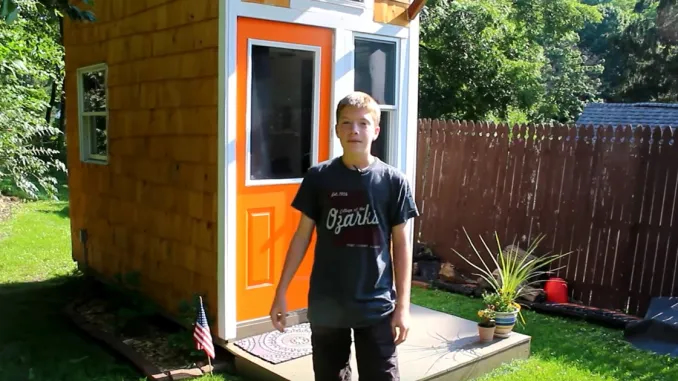
Many teenagers have their own room. Luke Thill has his own house. The 14-year-old Life Scout from Dubuque, Iowa, raised $1,500 performing odd jobs for neighbors and used a mix of reclaimed and purchased materials to build his own 89-square-foot tiny house in his parents’ backyard. The process took nearly two years. Luke says Scouting gave him both the leadership skills and craftsmanship needed to complete the process. “All the merit badges helped — Personal Management, Woodwork, Welding, Public Speaking, Communication,” Luke told me by phone. “All that kind of stuff plays a role.” The project has made Luke something of a celebrity both in the burgeoning tiny house community and beyond. He has nearly 45,000 subscribers on his YouTube channel, and his story has been featured by ABC News, Country Living magazine and many local media outlets.
In Partnership with

View Related Merit Badges

Chat Icon
Scoutly Toggle Size Close Chat
New Digital Resource Guides Available

New digital resource guides for two merit badges, Scholarship and Personal Fitness, are now available. No pamphlet required, check them out today!